
How to Download Shipping Bill from ICEGATE + Check Status

Once shipping bill is downloaded, payment realisation is next. Skydo issues FIRA on every export receipt, instantly.
TL;DR
- What is a shipping bill? The customs declaration you file when exporting goods from India. It tells customs what you are shipping, its value, the destination, and whether you are claiming duty drawbacks or GST refunds. Its "status" is the stage it sits at in the customs pipeline.
- What do you need to check the status? Your shipping bill number, the filing date (not the shipment date), and the customs location or port where it was filed. If you have lost the number, your CHA, export invoice, or shipping documents will have it.
- How do you check or download it on ICEGATE? Go to icegate.gov.in, Services, Enquiry, Public Enquiries 2.0, Document Status, then Shipping Bill. For the official assessment copy, log in and use the Document Download Utility.
- Why does the status matter? It directly affects your GST refund timeline, DGFT license utilisation, and EDPMS closure. A bill stuck at "assessed" holds up your refund, and a missing EGM keeps EDPMS from marking your obligation complete.
- What are the common issues? "No Record Found" usually means a wrong location or date entry. A status stuck before LEO points to invoice or HS code mismatches. LEO done but EGM not filed means the carrier has not submitted the manifest yet.
What is a shipping bill?
A shipping bill is the customs declaration you file when exporting goods from India. It tells customs what you are shipping, its value, the destination, and whether you are claiming any duty drawbacks or GST refunds. Once filed, it moves through stages of customs processing, from assessment to LEO (Let Export Order) and EGM filing, and the stage it sits at is its "status."
These statuses matter because they directly affect your GST refund timeline, DGFT license utilisation, and EDPMS closure. A shipping bill stuck at "assessed" holds up your refund, and a missing EGM keeps EDPMS from marking your obligation complete, which is why exporters check their status on ICEGATE to catch delays early.
For a full breakdown of every shipping bill status, what each one means, and how to check or download your shipping bill on ICEGATE, see our detailed guide: What is an ICEGATE Shipping Bill? Types, Filing & Status Check
💡 QUICK INSIGHT
A shipping bill is not the same as a Bill of Lading or Airway Bill. Those are transport documents issued by your logistics provider. The shipping bill is purely a customs document.

Revenue Leak Calculator
- ✓ Fees quietly eating margin?
- ✓ Current provider vs Skydo
- ✓ Reclaim what's yours
What documents are needed to check shipping bill status on ICEGATE?
You'll need a few basic details before you can check your shipping bill status or download it from ICEGATE. Keep these handy:
- Shipping Bill Number: This is the unique reference number assigned when your customs broker filed the declaration. It usually starts with a digit corresponding to your port code.
- Shipping Bill Date: The date the shipping bill was filed with customs, not the shipment date.
- Customs location or port: ICEGATE will ask you to select the location where the shipping bill was filed. This could be ICD Tughlakabad, Nhava Sheva Sea, or whichever customs station processed your export.
In some cases, especially if you're cross-checking via DGFT portals, you might come across references to port codes. These are just numerical identifiers for each customs location.
If you lost your shipping bill number
It happens more often than you'd think. If you don't have the number on hand, check these places:
- Your export invoice sometimes includes the shipping bill reference, especially if your accounts team maintains proper documentation.
- Your CHA (Customs House Agent) will definitely have it. They filed the document, so a quick email or call should get you the details.
- Shipping documents such as the Bill of Lading or commercial invoice, which are often issued by your freight forwarder, often include the shipping bill number in the remarks or reference section.
Once you have these details, you're ready to log in to ICEGATE and track your shipping bill.
How to download the shipping bill from ICEGATE
When exporters say "download," they usually mean one of two things. Here's how to handle both scenarios.
Option A : Download or save the status result (quick proof)
Once the shipping bill status loads on your screen, you can save it as a quick reference document. Just use your browser's print function and save the page as a PDF, or take a screenshot if you need it fast.
This works well for internal record-keeping, sharing updates with your team, or attaching proof to an email. It's not the official customs document, but it's enough for day-to-day operational needs.
Option B : Download the shipping bill document copy (official assessment copy)
If you need the actual shipping bill document say, for GST refund filing, audits, or DGFT reconciliation, you'll use ICEGATE's Document Download Utility.
Here's how it works:
1. Log in to ICEGATE services Head to the ICEGATE portal and sign in using your registered credentials. Make sure you're accessing the post-login services area, not just the public tracking page.
2. Go to Document Download or Download Utility The exact menu label may vary slightly with ICEGATE's interface updates, but look for options such as "Download Utility" or "Document Download" under the Services section.
3. Choose Shipping Bill and search Select "Shipping Bill (SB)" as the document type. You can search by shipping bill number or filter by a date range, whichever is more convenient.
4. Download and save Once the document appears, download it and save it to your system. This is the official copy you can use for compliance and documentation purposes.
📚Important real-world note
Some ICEGATE functions require a Digital Signature Certificate (DSC) or the use of ICEGATE's signer utility. If your login or download process prompts you for this, check ICEGATE's signer utility portal or contact their helpdesk for setup guidance.
How to track shipping bill status on ICEGATE: A step-by-step guide
Follow the step -by-step guide below to track your bill for shipping as you have filed it:
Step 1: Open a browser and head to the ICEGATE portal. Here, look for the option ‘Services’, hover over it and click on ‘Enquiry’.
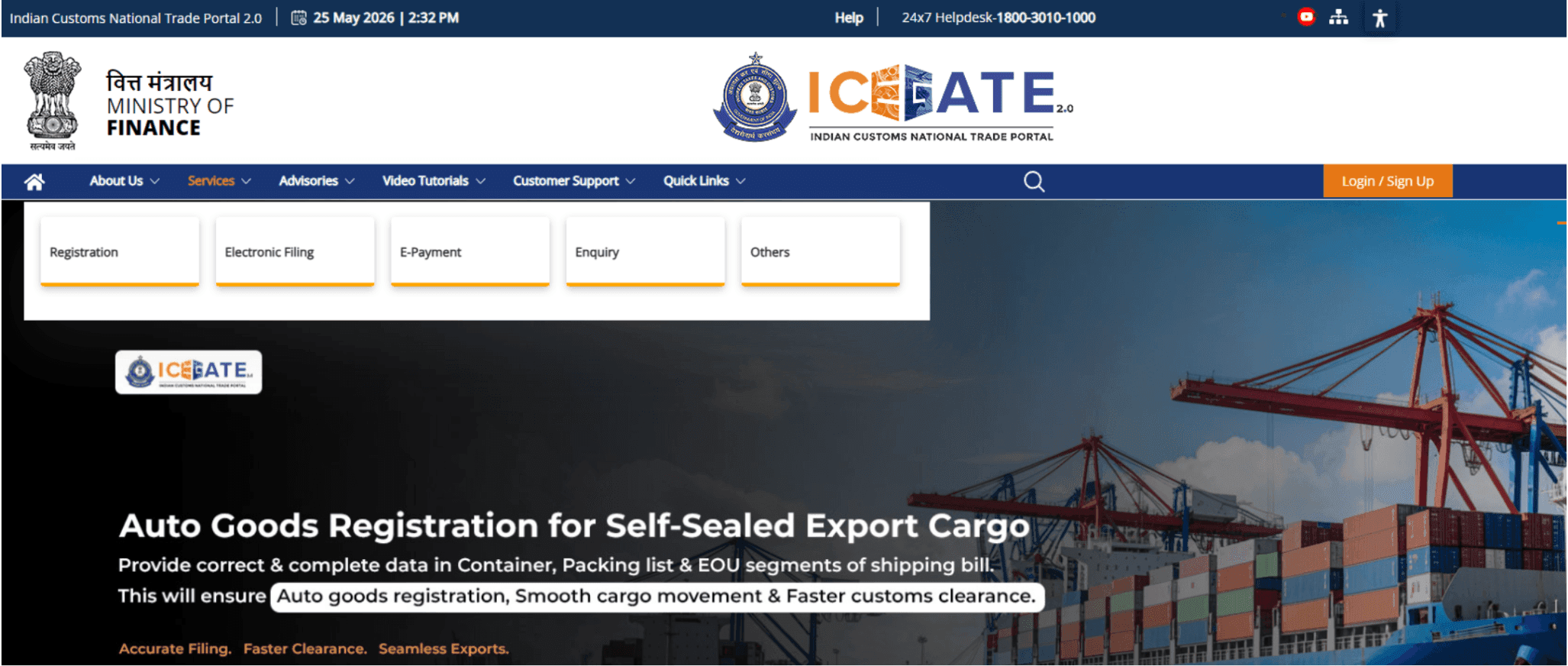
Step 2: Under ‘Enquiry’, click on ‘Public Enquiries 2.0’ to proceed further.

Step 3: Click on ‘Document Status’ and on the pop-up select ‘Shipping bill’.

Step 4: On the next page, fill out details under dropdowns such as ‘Select location’ and choose your port code. Enter your shipping bill number, its date and click on search.

Step 5: The next page will show the bill details, its current status, and other relevant bill-related information. Click on the tabs to view them.

Note: Exporters looking for old ICEGATE shipping bill status must follow this Public Enquiries 2.0 path on the ICEGATE portal. It is because the old portal is no longer active.
Track EDPMS status on ICEGATE
ICEGATE also lets you check "Status of SB in RBI – EDPMS" through its enquiry menu. EDPMS (Export Data Processing and Monitoring System) is the RBI's platform that tracks whether you've received payment for your exports within the prescribed timeline.
This matters because unmet export realisation obligations can trigger compliance notices, block future benefits, or complicate your banking relationships.
To check EDPMS status, you'll enter the same details: customs location, shipping bill number, and shipping bill date. The system will show whether your shipping bill has been closed in EDPMS or is still marked as pending or overdue.
If it shows "not closed" or "overdue," it usually means your bank hasn't yet reported the foreign exchange receipt to RBI, or there's a documentation mismatch. In that case, follow up with your bank's trade finance desk and confirm that the BRC (bank realisation certificate) or FIRC has been filed against the correct shipping bill reference.
Common issues (and exact fixes)
#1 "No Record Found"
If ICEGATE shows no record when you search for your shipping bill, check these first:
Wrong location selection – Make sure you've selected the exact customs station where the shipping bill was filed. If your CHA was filed at ICD Tughlakabad, but you selected Nhava Sheva, the system won't find it.
Wrong date format or mismatch – Double-check the shipping bill date. Use the exact filing date, not the shipment date or invoice date.
Manual, courier, or postal category – If your export was filed under a manual, courier, or postal shipping bill category, ICEGATE has separate enquiry options for these. Look for those specific menus under the tracking section.
#2 Status stuck before LEO / pending processing
If your shipping bill has been sitting in "assessed" or "under processing" for days, verify the following:
Check whether the invoice details match what was declared in the shipping bill. Mismatches in value, description, or HS codes can delay clearance.
Confirm that your CHA filed accurate data. Small errors in exporter details, iec number, or port of discharge can trigger manual reviews.
Reach out to your CHA and ask them to check the backend for any queries or hold orders from customs.
#3 LEO done, but EGM not filed
EGM (Export General Manifest) filing depends on the shipping line or airline, not customs. If your shipping bill shows LEO granted, but EGM hasn't been filed, it means the carrier hasn't yet submitted the manifest to customs.
This is a common blocker for EDPMS closure and DGFT integration. Contact your freight forwarder or CHA and ask them to follow up with the shipping line.
#4 ICEGATE page not loading / captcha issues
ICEGATE can be slow during peak hours or may throw captcha errors. Try these quick fixes:
Retry during off-peak hours (early morning or late evening).
Switch to a different browser (Chrome or Firefox usually works better).
Clear your browser cache and cookies, then reload the page.
If the issue persists, check ICEGATE's official status page or helpdesk for any updates on system maintenance.
Exporter's checklist
After every shipment, save these documents to avoid scrambling later during audits, GST refund filing, or DGFT reconciliation:
- Shipping bill status proof or downloaded copy: Either the PDF from ICEGATE's Document Download Utility or a saved screenshot of the status page. This is your primary customs record.
- LEO confirmation: Proof that customs cleared your shipment for export. You'll need this if there's ever a question about whether the goods were legally left in India.
- EGM confirmation: Shows that your shipment was included in the carrier's manifest and has departed. This is critical for closing EDPMS obligations and claiming benefits.
- EDPMS check screenshot (if relevant): If you're exporting under advance authorization or other schemes that require proof of realization of export proceeds, keep a record showing that your shipping bill has been marked as closed in EDPMS.
Payment realisation proof trail: Bank realisation certificate (BRC), FIRC, or foreign inward remittance confirmation. This ties your export to the actual funds received, completing your compliance loop.
How Skydo helps exporters stay compliant (without more work)
Checking shipping bill status is only half the compliance story. The bigger headache is stitching together customs, bank, and export realization paperwork.
That's where Skydo comes in. You get free, instant FIRA for every inward remittance, no waiting on your bank or following up for documents. For Amazon Global Sellers, the platform also handles automated eBRC generation, which is especially useful for Amazon sellers or exporters handling high transaction volumes and needing clean documentation trails for GST refunds and DGFT claims.
Instead of scrambling through emails and bank portals during audits, you have one place to keep all export payment documentation organized: shipping bills, invoices, FIRAs, and payment proofs.
If you're exporting regularly and tired of chasing documents, Skydo can automate the bank-side paperwork so your shipping bill trail actually closes cleanly.

Get international bank accounts in 5 mins

Save as much as ₹10 lakh annually with Zero FX Margin

Real time payment tracking and instant FIRA
Get international bank accounts in 5 mins
Save as much as ₹10 lakh annually with Zero FX Margin
Real time payment tracking and instant FIRA
About the author

Solution & banking
With a decade of experience at Citi Bank, Prashanth leads payments partnerships and solutions at Skydo.

Verified by
CA Akshay KumarLatest blog posts
View all posts
Bank Routing Number: Meaning, Format, Uses & How to Find It
What is Bacs Direct Debit? Working & Use Cases in 2026
PSD2: Meaning, Features, Benefits & PSD3 Explained
Related blog posts
View all posts
OPGSP: Meaning, Transaction Limits & PA-CB Update (2026)

Foreign Tax Credit Form 67: Filing, Eligibility & Due Date